


Local Docker-compose Usage
Install docker-compose, refer to Official Documentation
How to install docker-compose on Linux, Mac, Windows, click to expand and view
Install on Linux
# 1.1 Run this command to download the current stable version of Docker Compose
sudo curl -L "https://github.com/docker/compose/releases/download/v2.20.2/docker-compose-$(uname -s)-$(uname -m)" -o /usr/local/bin/docker-compose
# 1.2 Apply executable permissions to the binary file
sudo chmod +x /usr/local/bin/docker-compose
Install using Python pip
pip3 install docker-compose -i https://pypi.tuna.tsinghua.edu.cn/simpleUsing Docker Desktop
Clone and enter this project using Git
git clone https://github.com/flipped-aurora/gin-vue-admin.git && cd gin-vue-adminUse docker-compose up to start the project with one command
# Use docker-compose to start four containers
docker-compose -f deploy/docker-compose/docker-compose.yaml up
# If you modified some configuration options, you can use this command to repackage images
docker-compose -f deploy/docker-compose/docker-compose.yaml up --build
# Use docker-compose to start in background
docker-compose -f deploy/docker-compose/docker-compose.yaml up -d
# Use docker-compose to repackage images and start in background
docker-compose -f deploy/docker-compose/docker-compose.yaml up --build -d
# After all services start successfully, use this command line to clear none images
docker system prune- Web project preview http://127.0.0.1:8000
- Swagger documentation http://127.0.0.1:8888/swagger/index.html
Notes
Issues to note when using docker-compose for experience
- In the initialization data page
IP please fill in the IP from line 56 of docker-compose.yaml, or directly use
mysql, as shown belowDatabase is
qmPlusPort is
3306Username is
gvaPassword is the database password defined in line 52 of docker-compose.yaml
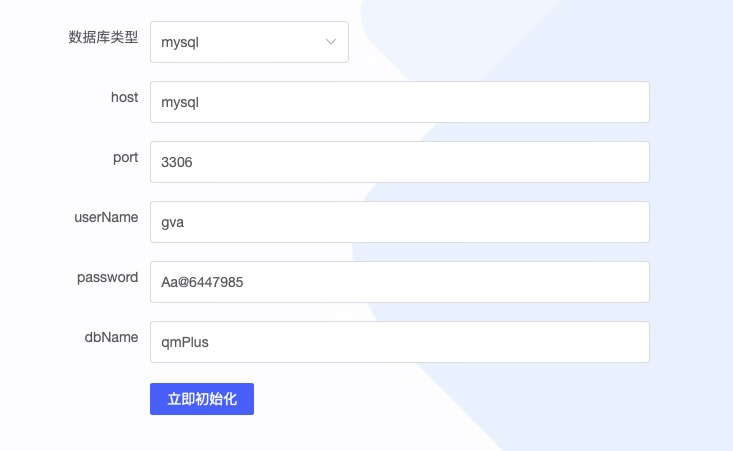
- If server's 177.7.0.12 container internal IP is occupied, the places to modify are
- Line 42 of docker-compose.yaml replace 177.7.0.12 with your desired IP
- Line 20 of web/.docker-compose/nginx/conf.d/my.conf replace 177.7.0.12 with your desired IP
Issues to note when using docker-compose for deployment
docker-compose uses a custom docker network
  networks:
    network:
      ipam:
        driver: default
        config:
          - subnet: '177.7.0.0/16'
Subnet address, default gateway is 177.7.0.1 (docker-compose V2 needs to write, V3 doesn't), see official documentation for details
Default network name is gin-vue-admin_network, default is bridge mode
If you modify the subnet, the ipv4_address of each service needs to be modified, and the server IP in line 20 of web/.docker-compose/nginx/conf.d/my.conf also needs to be modified
server/Dockerfile uses multi-stage build, which was introduced after docker 17.05, so the installed docker version needs to be higher than 17.05
Please use mysql database installed on server disk
- Avoid using mysql in docker containers, there may be write issues, IO is lower than host due to docker's persistence mechanism issues.
When deploying using this project's docker-compose, please modify the corresponding nginx configuration, mysql configuration, networks configuration, redis configuration in docker-compose.yaml as needed.